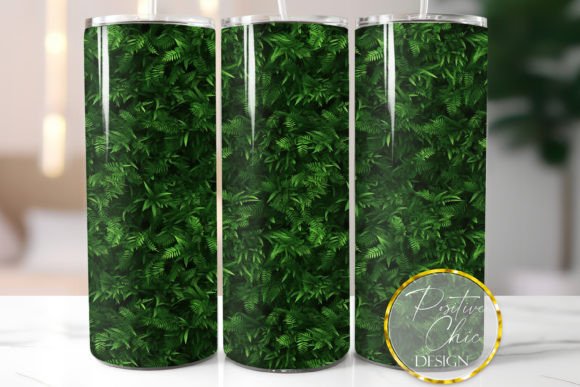
3D Plant Tumbler Wrap Design Sublimation: A Practical Guide to Flawless Results
There is a distinct appeal to botanical aesthetics in the custom drinkware market. The 3D Plant Tumbler Wrap Design Sublimation trend has gained momentum because it offers depth and texture that flat vector art simply cannot replicate. When executed correctly, these designs transform a standard stainless steel vessel into a piece of functional art where leaves appear to float above the surface or wrap seamlessly around curves. For creators and small business owners, this style provides a high-perceived value product that stands out at craft fairs and in online listings.
However, the transition from a digital preview to a physical tumbler is where many enthusiasts encounter friction. The allure of a lush, three-dimensional floral arrangement can quickly fade if technical specifications are overlooked. Understanding the nuances of this specific 20 OZ Skinny Tumbler Wrap Sublimation Design PNG is essential for avoiding wasted materials and ensuring your final product matches the professional quality promised by the digital file.
Understanding File Specifications and Sizing Realities
One of the most frequent issues arises from a misunderstanding of digital dimensions versus physical application. This specific instant digital download provides a single PNG file at 300 DPI, measuring approximately 9.3 x 8.2 inches. It is crucial to recognize that this size is intentionally created slightly larger than the standard 20oz skinny straight tumbler dimensions.
This oversizing is a feature, not a flaw. Manufacturers produce tumblers with varying circumferences and heights, even within the same "20oz skinny" category. A design sized to exact specifications for one brand may leave an unsightly vertical gap or fail to align properly on another. By providing a buffer, the design allows you to resize and crop the image to fit your specific blank’s exact measurements.
Practical Advice: Never assume the default size will work perfectly. Always measure your specific tumbler blank before printing. Use your software to adjust the canvas or scale the image proportionally. If your tumbler is 9.2 inches in circumference, centering the design and trimming the excess digitally ensures seamless edge-to-edge coverage without distortion of the 3D plant elements.
Software Compatibility and the Cutting Machine Misconception
A critical distinction that must be made early in the workflow involves file type compatibility. This product is strictly a raster sublimation file. No SVG files are included. This leads to a common point of confusion for makers who primarily work with vinyl or paper crafting.
You should not attempt to open or print this design using cutting software like Cricut Design Space or Silhouette Studio. These platforms are engineered for vector paths and cut lines, not high-resolution color management for sublimation. Attempting to force a 300 DPI PNG through a cutting program often results in compressed image quality, color shifting, or complete software failure. Furthermore, this is not a cut file; there are no layers to separate or weed.
Better Approach: Utilize software designed for raster graphics and color accuracy. Free and accessible options include Paint, Canva, or Inkscape. These programs handle pixel-based images correctly and allow for the necessary resizing without degrading the intricate details of the 3D plant rendering. If you already own professional sublimation RIP software or photo editing suites, those remain the gold standard for maintaining color fidelity.
Managing Color Expectations and Equipment Requirements
The vibrant greens and shadowed depths in a 3D plant design rely heavily on accurate color reproduction. A pervasive mistake in the sublimation community is expecting screen colors to match printed output. Monitors emit light using RGB color profiles, while sublimation printers use CMYK inks. Without proper color management, the rich forest tones on your screen may print as dull olives or muddy browns.
Additionally, it is vital to confirm you possess the correct infrastructure before purchasing. Sublimation requires specialized equipment, including a sublimation printer, specific sublimation inks, and polyester-coated substrates. Standard inkjet inks will not bond to the tumbler coating, and standard tumblers without a poly-coating will not accept the transfer. This design file is merely the digital blueprint; the physical realization depends entirely on your hardware.
- Color Profiles: Ensure you have installed the correct ICC profile for your specific printer and ink combination. Generic profiles rarely capture the nuance of 3D shading.
- Test Prints: Always print a test strip on sublimation paper before committing to a full wrap. Colors vary significantly based on humidity, ink age, and substrate brand.
- Monitor Calibration: Understand that colors vary from computer to computer. What looks perfect on a laptop may look different on a desktop. Trust your test prints over your screen.
Preserving Detail During Resizing and Application
Because this is a 3D render, the illusion of depth is created through subtle gradients and shadows. Aggressive resizing or improper aspect ratio adjustments can flatten these effects, making the plants look pasted on rather than integrated. When adjusting the 9.3 x 8.2-inch file to fit your tumbler, maintain the aspect ratio to prevent stretching.
If significant cropping is required due to a smaller tumbler circumference, focus on removing background space rather than central design elements. The 3D effect is usually concentrated in the center and edges where the seam meets. Distorting the seam area destroys the continuity of the wrap. Take time to align the pattern so that when the tumbler is rotated, the botanical elements flow naturally without abrupt visual breaks.
Evaluating Quality Before Production
Before investing time and materials into pressing this 20 OZ Skinny Tumbler Wrap Sublimation Design PNG, perform a digital audit. Zoom in to 100% on the file to check for artifacts or pixelation. While 300 DPI is standard for print, ensure the resolution holds up at your intended print size. Since the file is provided slightly large, you have the advantage of downscaling, which generally preserves sharpness better than upscaling.
Consider the finish of your tumbler blank as well. Glossy finishes tend to enhance the 3D effect by reflecting light off the raised-looking areas of the design, while matte finishes can soften the contrast. Matching the design aesthetic to the appropriate substrate finish is a subtle detail that elevates the perceived professionalism of the final product.
By respecting the technical boundaries of the file and understanding the specific requirements of sublimation printing, you can leverage this 3D Plant Tumbler Wrap Design to create stunning, market-ready drinkware. Success lies not just in the beauty of the artwork, but in the precision of its application. Treat the digital file as a component of a larger manufacturing process, and your results will consistently reflect the quality your customers expect.