Wind Spinner 3D Butterfly Sublimation: Integrating Digital Assets into Production Workflows
In the competitive landscape of personalized outdoor decor and sublimation printing, efficiency begins with asset management. The Wind Spinner 3D Butterfly Sublimation design serves as more than just a decorative graphic; it is a foundational component in a broader manufacturing or creative workflow. For small business owners, hobbyists, and professional creators, understanding how to leverage high-resolution digital assets effectively can determine the difference between a seamless production run and costly reprints. This specific digital package provides the technical specifications necessary for commercial-grade output, but realizing its value requires integrating it properly into your pre-press, printing, and marketing processes.
Technical Specifications and Pre-Press Preparation
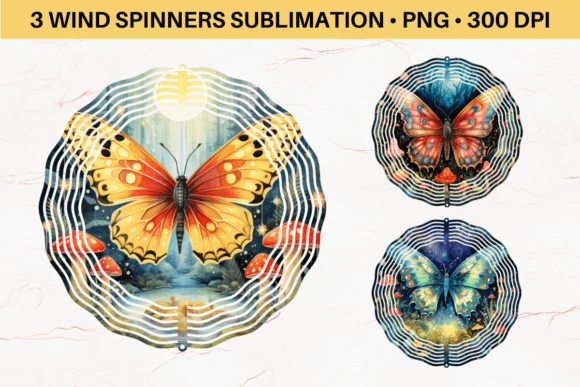
Before initiating any print job, verifying asset compatibility is the first critical step in quality control. This Wind Spinner 3D Butterfly Sublimation package includes three distinct PNG files sized at 10.5 inches by 10.5 inches with a resolution of 3150 x 3150 pixels. This dimension is not arbitrary; it corresponds to standard wind spinner blank sizes available from major wholesale suppliers. Maintaining this exact aspect ratio prevents distortion during the transfer process, ensuring the 3D butterfly effect remains visually coherent when the spinner is in motion.
The 300 DPI resolution is the industry benchmark for sublimation. While some designers attempt to upscale lower-resolution images, this native high-density pixel count ensures crisp edges and vibrant color saturation on metal or polymer-coated substrates. When incorporating these files into RIP software or design platforms like Photoshop, Affinity Photo, or Sawgrass Print Manager, users should avoid resizing beyond the 10.5-inch limit. Upscaling raster-based PNGs introduces pixelation that becomes glaringly obvious on reflective spinner surfaces. Instead, treat the 3150 x 3150 PX canvas as the maximum printable area.
A crucial distinction for workflow planning is the file format. These assets are NOT SVG files and are not layered for cutting. This specification dictates their role in your production line. They are intended exclusively for sublimation transfer onto pre-cut blanks rather than for vinyl application or laser engraving. Attempting to use these as cut files will result in software errors and wasted time. By clearly defining the asset's purpose upfront, creators can streamline their file organization systems, keeping sublimation-ready PNGs separate from vector-based cutting designs to prevent operational confusion.
Workflow Integration: From Digital File to Physical Product
Integrating the Wind Spinner 3D Butterfly Sublimation design into a production environment involves specific handling procedures to maintain image integrity. Because the files arrive in a ZIP archive, proper digital asset management (DAM) is essential immediately upon download. Extract the files to a dedicated project folder rather than working directly from the compressed archive. This prevents file corruption and ensures that your design software references a stable local path.
During the design phase, consider the interaction between the digital art and the physical substrate. Wind spinners are dynamic objects; the artwork must account for movement and lighting. The 3D butterfly design included in this pack utilizes shading and perspective to create depth, but this effect relies heavily on accurate color profiling. Before committing to a full production run, execute a test print on sublimation paper using your specific printer and ink combination. Color gamuts vary significantly between OEM and third-party inks. A soft-proofing step within your color-managed workflow allows you to preview how the vibrant butterfly hues will translate to the metallic or white base of the spinner blank.
Heat press parameters also interact directly with the digital asset’s performance. High-quality sublimation requires precise temperature, time, and pressure settings. While the PNG provides the visual data, the physical transfer locks it in. For 10.5-inch spinners, ensure your heat press platen accommodates the full surface area evenly. Uneven pressure can cause ghosting or blurring, negating the sharpness of the 3150 x 3150 PX source file. Many professionals use silicone pads or Teflon sheets to distribute pressure uniformly across the circular or shaped blank. Documenting these settings alongside the digital file creates a repeatable standard operating procedure (SOP) for future orders.
Leveraging Mockups for Marketing and Client Approval
The inclusion of Wind Spinner Mockups in this digital package extends the asset’s utility beyond production into the sales and marketing phases of a business workflow. For entrepreneurs and marketers, mockups bridge the gap between a flat digital file and a tangible product perception. Before listing items on e-commerce platforms or presenting concepts to clients, utilize these mockups to visualize the final outcome.
This step serves multiple strategic functions. First, it acts as a quality assurance checkpoint. Viewing the design in a realistic context helps identify potential alignment issues or color clashes that might not be apparent on a plain white background. Second, it accelerates the decision-making process for custom orders. Clients often struggle to visualize how a 2D PNG translates to a spinning 3D object. Providing a photorealistic mockup reduces revision cycles and increases conversion rates by setting accurate expectations.
For content creators and bloggers, these mockups provide ready-made visual assets for social media and website listings without requiring immediate physical inventory. This supports a "print-on-demand" or pre-sale business model where marketing materials can be deployed instantly after purchasing the digital download. Integrating mockup generation into your post-purchase workflow ensures that your online storefront remains consistent with the actual product quality delivered by the high-resolution source files.
Digital Asset Management and Licensing Compliance
Efficient workflows rely on organized resources. Since this item is an instant digital download containing no physical products, establishing a robust filing system is paramount. Create a standardized naming convention for your sublimation assets. For example, renaming the generic files to include metadata such as "WindSpinner_Butterfly3D_10.5in_Sublimation.png" facilitates faster retrieval during busy production periods. Cloud backup solutions should be configured to sync these folders automatically, protecting your investment against hardware failure.
Understanding usage rights is equally important for professional compliance. As a digital purchase, verify the licensing terms associated with the ZIP file. Typically, these assets are licensed for personal use or small business commercial use, but restrictions may apply to mass production or resale of the digital file itself. Respecting these boundaries protects your business from legal exposure and supports the ecosystem of digital designers. Keep the original receipt and license documentation in the same project folder as the PNGs for easy reference during audits or platform verification requests.
Quality Control and Troubleshooting Common Issues
Even with high-quality source files like the Wind Spinner 3D Butterfly Sublimation PNG, variables in the physical world can affect outcomes. Implementing a systematic troubleshooting protocol saves time and materials. If prints appear dull compared to the screen preview, check your ICC profile settings rather than blaming the file resolution. Sublimation inks often look muted on paper before heat activation; always evaluate quality based on the pressed result, not the paper transfer.
Alignment is another frequent challenge with circular or shaped spinners. Since the PNG is a square 10.5 x 10.5 inch canvas, centering the butterfly design requires precision. Use alignment tools within your design software to mark the center point of the canvas. When placing the sublimation paper on the blank, use heat-resistant tape to secure the paper and prevent shifting during the press cycle. Some operators prefer to print a faint center mark or registration lines outside the bleed area to aid in physical placement. These practical adjustments ensure the digital precision of the 3150 x 3150 PX file translates accurately to the physical medium.
Finally, consider the longevity of the finished product. Sublimation dyes bond permanently with polymer coatings, making them UV resistant and durable for outdoor use. However, the lifespan depends on the quality of the blank and the completeness of the transfer. Incomplete transfers due to insufficient heat or time can lead to premature fading. By treating the Wind Spinner 3D Butterfly Sublimation asset as part of a holistic system—encompassing digital preparation, color management, physical pressing, and post-production evaluation—creators can consistently deliver professional results that satisfy customers and streamline operations.