Mastering the 3D Christmas Gingerbread SVG DXF Bundle for Flawless Holiday Projects
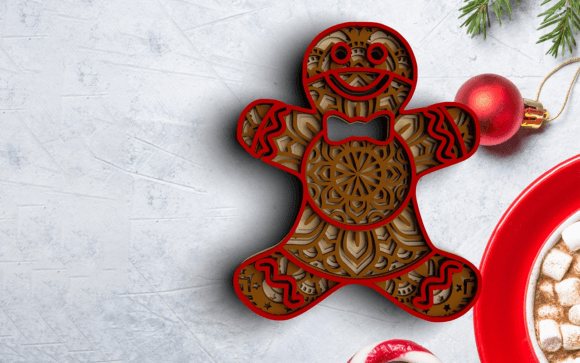
The holiday crafting season often brings a rush of excitement, but it also introduces specific technical challenges that can turn a joyful project into a frustrating experience. When working with intricate designs like the 3D Christmas Gingerbread SVG DXF Bundle, the difference between a professional-looking shadow box and a pile of wasted material usually comes down to preparation and file management. This specific design, featuring four distinct layers that blend traditional gingerbread aesthetics with complex mandala geometry, requires more attention to detail than standard flat vinyl decals. Understanding how to properly handle these layered files ensures your Cricut, Silhouette, or laser cutter produces crisp, aligned results suitable for gifting or home decor.
Understanding Layered Architecture vs. Flat Cutting
A common misunderstanding among crafters transitioning from 2D to 3D projects is treating a layered mandala as a single composite image. The 3D Christmas Gingerbread SVG DXF Bundle is engineered with depth in mind. Each of the four layers serves a structural and aesthetic purpose, creating shadows and dimension when stacked. If you attempt to weld or attach these layers into a single cut file within your software, you destroy the intended 3D effect and may cause cutting errors due to excessive node density.
Instead, approach this bundle as a construction kit. Keep the layers separate in your design space. Use registration marks or alignment guides if your software supports them, or rely on the precise geometry of the mandala center to stack them manually after cutting. For laser cutter users, this separation allows you to adjust power and speed settings for each layer individually. The bottom layer might require a slower pass for stability, while the top ornamental layer benefits from faster, lighter cuts to preserve delicate gingerbread details. Treating the bundle as a cohesive system rather than a single graphic is the first step toward achieving that premium shadow box look.
Selecting the Correct File Format for Your Machine
Digital download bundles typically include multiple formats, and choosing the wrong one is a frequent source of quality issues. This bundle provides SVG, DXF, EPS, and PNG files, each serving a distinct technical function. Using a PNG for cutting, for example, will result in pixelated edges and jagged lines because raster images lack vector paths. Similarly, relying on DXF files in Cricut Design Space can sometimes lead to sizing discrepancies or lost internal cut lines, as DXF is primarily optimized for CAD and laser applications rather than consumer vinyl cutters.
- SVG Files: Best for Cricut Design Space and Silhouette Studio Designer Edition. These retain layer information and scale infinitely without quality loss.
- DXF Files: Ideal for laser cutting software like LightBurn or RDWorks, and essential for older Silhouette Basic Edition users who cannot open SVGs.
- EPS Files: The industry standard for professional laser printing and Adobe Illustrator editing.
- PNG Files: Strictly for sublimation, print-then-cut projects, or digital mockups at 300 DPI resolution.
Before importing, verify which format aligns with your specific hardware. If you are using the individual SVGs provided for each layer, ensure they are imported onto separate canvases or arranged precisely before cutting to maintain the dimensional integrity of the gingerbread mandala design.
Material Selection and Thickness Tolerances
The visual success of a 4-layer 3D design depends heavily on material consistency. A mistake many makers make is mixing cardstock weights or wood veneer thicknesses without accounting for the cumulative stack height. If the gingerbread-themed mandala is designed for 65lb cardstock but you substitute 110lb cover stock, the final piece may be too thick for your shadow box frame or fail to fit into pre-designed slots. Conversely, using paper that is too thin can cause the layers to sag, eliminating the crisp shadow lines that define the 3D effect.
Always test your material thickness against the design specifications before committing to a full production run. For laser cutting, perform a kerf test to ensure the interlocking parts or stacking tolerances accommodate the burn width of your specific machine. When using cardstock with a Cricut or Silhouette, ensure your blade is sharp and your mat has adequate stickiness; intricate mandala cuts can tear easily if the paper shifts during the detailed inner cuts. Consistent material choice preserves the architectural balance of the layered design.
Optimizing Cut Settings for Intricate Mandala Details
Gingerbread mandalas combine organic curves with geometric precision, creating a unique challenge for cutting machines. Standard preset settings often fail to capture the fine details of the inner layers. A frequent error is leaving the machine on "Cardstock" or "Wood Veneer" default settings without adjustment. This can lead to uncut fibers in tight corners or scorched edges on delicate protrusions.
For paper crafts, consider using a deep-point blade or increasing pressure slightly while reducing speed to ensure clean perforations through intricate areas. For laser users, air assist is crucial to prevent charring on the light-colored surfaces typical of gingerbread themes. You may need to run a separate test file focusing solely on the smallest elements of the mandala to dial in the perfect balance of speed and power. Remember that the top layer usually contains the finest details; prioritize its quality over the base layers, which are more forgiving. Taking ten minutes to calibrate your machine saves hours of weeding frustration or wasted expensive materials.
Assembly Strategies for Professional Presentation
Even with perfect cuts, poor assembly can undermine the value of your finished piece. Rushing the gluing process or using the wrong adhesive are common pitfalls. Liquid glue can warp cardstock, causing the mandala layers to buckle and misalign. Hot glue adds unwanted bulk between layers, pushing them apart and distorting the intended shadow depth.
For the best results with this 3D Christmas Gingerbread SVG DXF Bundle, use foam tape or silicone glue dots for spacing, or a high-tack, low-moisture adhesive like tacky glue applied sparingly with a precision tip. Align layers from the center outward, using the mandala’s symmetry as your guide. If creating a shadow box gift, ensure the backing board is rigid enough to support the weight of four layers without bowing. Planning your assembly method before making the first cut ensures the final product looks intentional and polished, whether it hangs on a tree or sits on a mantle.
Verifying License and Usage Rights
Finally, always review the licensing terms included with your instant download. While this bundle is perfect for personal gifts and home decor, commercial use for selling physical products may have specific limitations or requirements. Entrepreneurs and small business owners should confirm whether the license covers mass production or requires attribution. Respecting these terms protects your business and supports the designers who create these complex layered files. By combining technical precision with ethical usage, you maximize both the quality of your craft and the sustainability of the creative community.